
Every change means a ticket
Need a new menu before tomorrow's launch, or holiday routing for next week? On most systems you raise a ticket with the carrier and wait, instead of just making the change yourself.
You decide how every call should flow: by who's free, what the caller needs, and the time of day. Build IVR menus, ring groups, and queues in a visual editor, and Voxbi routes every caller to a real person instead of an empty desk.
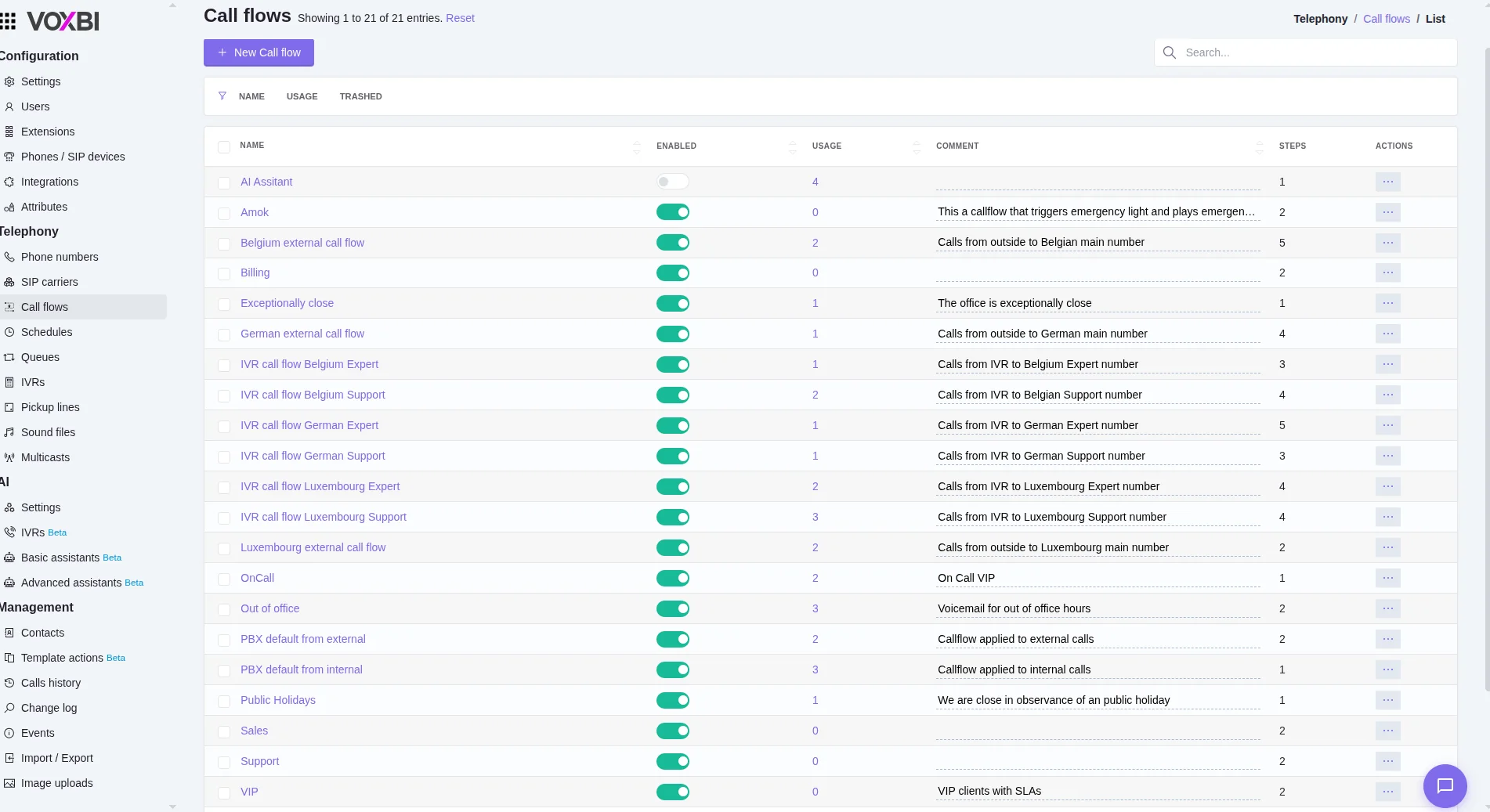
Need a new menu before tomorrow's launch, or holiday routing for next week? On most systems you raise a ticket with the carrier and wait, instead of just making the change yourself.
Presence is a manual switch. The moment someone forgets to set themselves busy, calls ring an empty desk, and the complaints land on whoever runs the system.
Desk phones get the routing logic; remote and mobile staff get bolted on after. Across multiple sites or clients, there's no single place to see and change how calls flow.
Menus, ring groups, queues, and presence rules all live in a single visual dashboard. Adjust how calls are handled yourself, without a provider ticket.
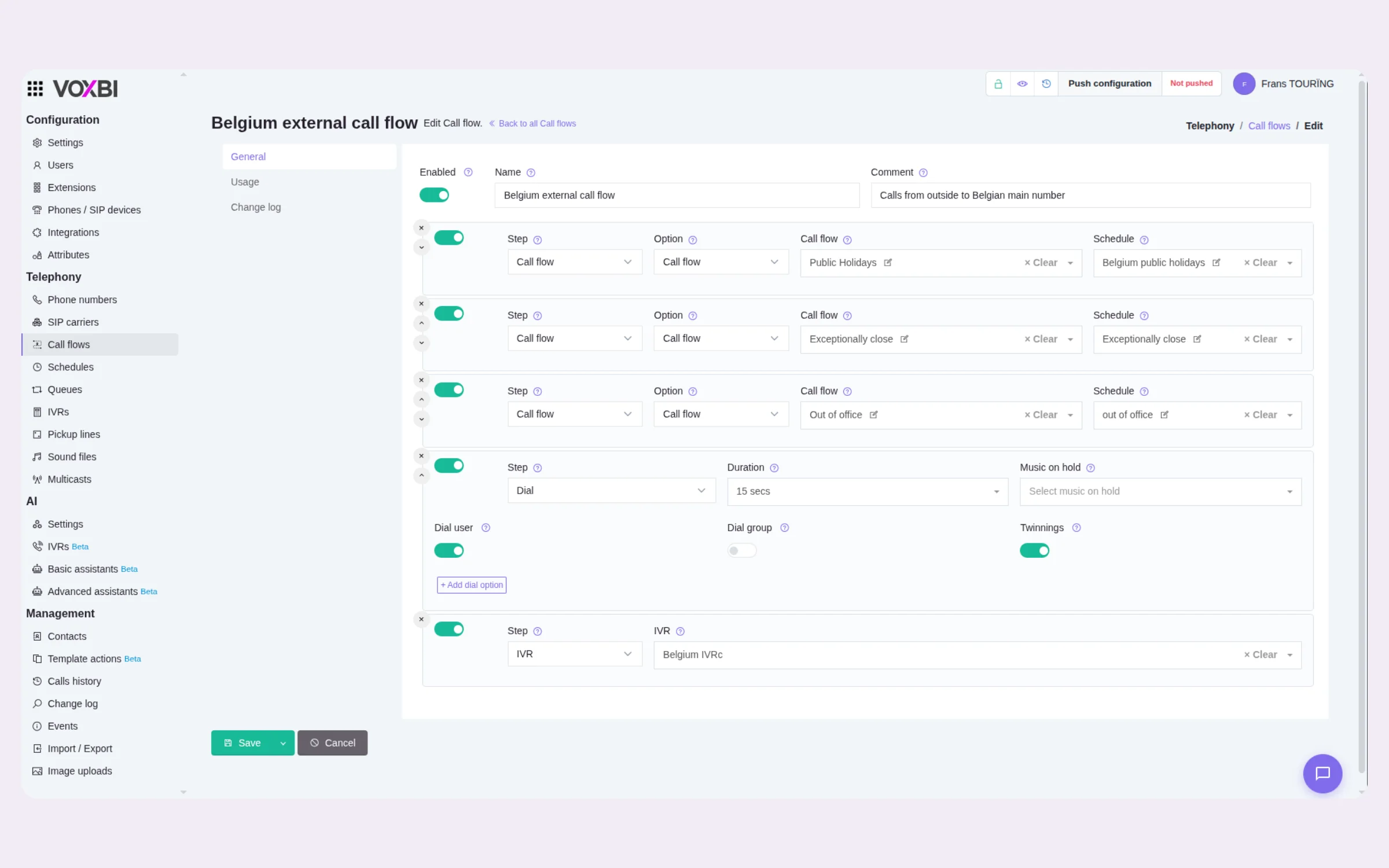
Someone dials your business number and Voxbi receives the call instantly, on any number you have ported or bought.
Your call flow runs: the IVR menu choice, who is available right now, skills and language, and the time of day.
The call rings the first available match (desk phone, softphone, or mobile) and skips anyone busy or offline.
If no one is free, the call rolls to a queue, voicemail, or another team. You set the rule; Voxbi applies it every time.
Greet callers with a menu (“press 1 for sales, 2 for support”) and send each choice to the right team. Multi-level menus, with recorded or text-to-speech prompts.
Ring a whole team at once, or hunt through members in order until someone picks up. You set the order and the timeout for each group.
When everyone is busy, hold callers in a queue with music and position announcements instead of dropping them straight to voicemail.
Skip anyone on a call, in a meeting, or offline. Voxbi reads real device and calendar status so calls only ring people who can actually answer.
Tag people by skill, language, or location, and send each caller to the best-matched person automatically.
Run different flows by business hours, public holidays, or on-call schedules. After-hours calls go exactly where you decide.
Good routing is the difference between a booked customer and a missed one.
Calls reach a real person, not an empty desk. Fallback rules catch the overflow, and voicemail stays the exception.
Callers skip busy lines automatically, and skills-based routing sends each caller to the person who can actually help.
Office, home, and mobile all count equally. One number covers every working location, with status updating automatically.
Most cloud PBXs route calls. The difference is how much control you keep, and what it runs on.
Voxbi is very user-friendly for end users, while still letting us implement more advanced configurations centrally.
We have been able to expand across the entire European Union and even internationally without ever worrying about communication costs or technical constraints.
You should map menus, queues, and fallbacks yourself and publish in minutes. If routine changes need a vendor ticket, you don't really own your routing.
Manual busy toggles get forgotten. Routing should read real device and calendar state on its own, across desk phone, desktop, and mobile.
Outlook and Google Calendar blocks should set people to away on their own, so a meeting never sends a caller to a line nobody picks up.
Out of hours the whole flow should change to a duty mobile, voicemail, or an after-hours message, not just a new greeting on the same broken path.
The call follows the fallback you set: a queue with hold music, voicemail, another department, or a mobile outside the system. You choose the rule; Voxbi applies it automatically.
Yes. Combine presence-based routing with time-of-day rules, so out-of-hours calls go straight to voicemail or a duty phone regardless of who is online.
Yes. As long as your team uses the Voxbi app, their availability feeds the same routing logic as a desk phone: office, home, or on the road.
Yes. The visual editor lets you create multi-level menus (press 1 for sales, press 2 for support), record or type greetings, and change them whenever you need.
Yes. Give anyone a direct number (DID) or use a dial-by-name directory, so regular callers skip the menu and reach the right person straight away.
Yes. Callers can keep their place in the queue and be called back when an agent is free, rather than waiting on hold, which is better for them and for your service levels.
Always. Flows live in a visual editor you control: drag steps, edit menus, change schedules, and publish in minutes. No ticket, no waiting on your provider.
Start a free trial and build your first call flow in minutes. No credit card required.